
 L Lemo-Opuscar
16-bit 像素 RPG
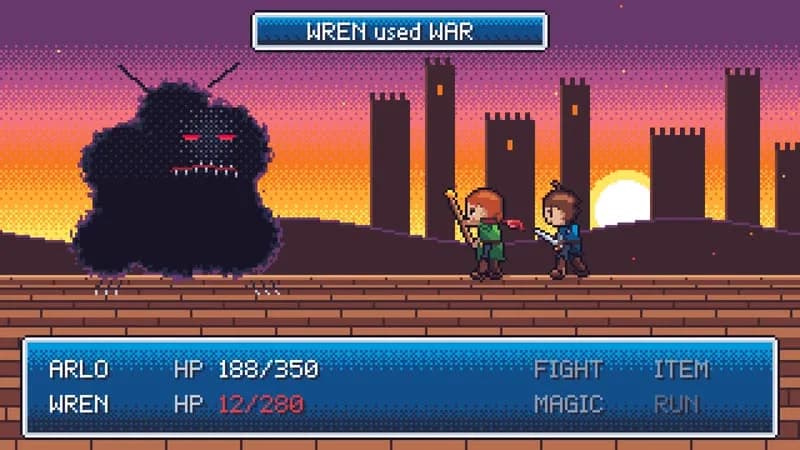
勇士在最终 Boss 门前存档,存档画面闪回一路冒险。
- 适合:
- 学习像打怪升级
- 系列:
- L Lemo-Opuscar
- 更新:
- 2026-10-29
风格提示词
16-bit Pixel RPG — Style Prompt
A short film that looks, sounds and behaves like a mid-90s console role-playing game: 320×180 pixels, a limited indexed palette, text boxes that type, menus, save files, chip music with echo.
References (grammar only): mid-90s console RPGs as a system of dialog boxes, menus, battles, overworlds and save points; the palette tricks of indexed hardware (palette swaps, fades by steps, cycling); the colour-depth history of consoles (4 shades → 8-bit → 16-bit). Never use existing game names, characters, UI frames, fonts, logos, melodies or sound effects. Learn the grammar, not the assets.
1. Essence, and what it is not
- 320×180 native pixels, scaled ×6 nearest-neighbour to 1080p; everything, text included, lives in the framebuffer.
- A limited, indexed palette; gradients are ordered dither, never blends.
- Sprites around 20–34 px tall animating in a handful of frames; faces act in portraits.
- Story told the way a game tells it: dialog boxes with portraits, menus, status bars, battle messages, save files, item fanfares.
- It takes the game's systems seriously as a language for feeling.
Not HD-2D (no depth of field, bloom or real-time light), not CRT nostalgia (no scanlines, no grain), not a parody.
2. Materials & rendering
- Indexed framebuffer (
Uint8Arrayof palette indices) presented through a lookup table (index → RGB), so a whole palette can change in one frame. Camera moves are integer pixels; each parallax layer rounds its own offset. - Master palette of ~32 colours (a free palette such as ENDESGA-32), plus protected duplicates of a few indices that no palette effect touches.
- Colour-depth tables computed from the master palette: identity (16-bit), nearest of ~15 NES-like colours (8-bit; it needs a dark green and a dark brown), 4 fixed luminance thresholds (4-colour, drawn natively at 160×90 and doubled), a faded set (
lum^0.8→ ~7 blue-greys), and intermediate subsets for step-by-step collapse. Map by luminance, never by rank. - Light is index stepping:
LIGHT[]/DARK[]tables move each index one step along its ramp; glows are Bayer-thresholded rings. Firelight in a low-colour era uses a warm remap (greens → browns → rust), not generic brightening. - Dither: 4×4 Bayer for gradients and glows; light shafts as a flat 50 % checker with a 25 % edge.
- Sprites from a rig: capsule limbs with 3-tone shading from an upper-left light, a per-part inner line in the material's darkest tone, a global 1-px ink outline, plus hand-placed ASCII heads. One rig gives every pose; lower eras drop the highlight tone. Give the hero a silhouette mark (a garment tail, a hat, a hairstyle).
- Portraits 32×32, 3/4 view, base face + eye/brow and mouth overlays; they carry facial acting (the sprite face has one eye pixel).
- Props can be flat-shaded 3D shapes quantised to a few protected indices (e.g. a rotating crystal at 8 frames per 90°).
3. Colour logic
- Palette = feeling. Colour depth, fades and swaps are story tools; change the whole palette by table, never by alpha.
- Colour depth can stand for time: older = fewer colours, lower resolution.
- Protected indices: a few colours exempt from every effect become the thread through the film and allow match cuts between eras. Use one or two; more and they stop meaning anything.
- Warm hues survive reductions: keep orange, pink and plum in reduced subsets, or the first step turns a scene solid red.
- Example uses of protected colours: a red kite across a childhood; a gold coin in a grey economy; the green of one plant in a faded city.
4. Type & subtitles
- The dialog box is the subtitle, drawn in the framebuffer at the bottom quarter: a layered rounded border (ink / white / silver), a dithered dark-blue fill, a 32×32 portrait on the left, an original variable-width pixel font (cap ~7 px) with a 1-px shadow. It types with the voice (~38–40 chars/s; slower in older eras), ▼ blinks when done.
- Skins follow the era (light box for 4-colour, black box with white frame for 8-bit, blue for 16-bit).
- Battle and system messages go in a thin top window. Every box stays ≥ max(1.8 s, speech + 0.6 s); the next box cuts the previous one. Export the
.srtfrom the same subtitle array. - Titles in the pixel font at 2×, 8-neighbour ink outline, row-by-row gradient, Bayer-dissolved in and out.
5. Motion quality
- Output 24 fps. Sprites step at 8 fps (walk) to 12 fps (flames, blinks); camera and parallax move on ones at integer pixels.
- Game-native acting: hop forward to act, cast pose, knockback recoil, kneel, KO blink (12 fps on/off) and vanish; breath = shoulders up 1 px.
- UI motion: windows slide in over ~0.3 s (ease-out, integer px); a hand cursor bobs 1 px at 4 fps and stops when the character hesitates.
- Transitions: thumbnail expand + mosaic, mosaic cross with a palette switch at the peak, the encounter swirl (polar twist + mosaic + Bayer dissolve to white), screen shake (3–2–1 px over 8 frames), palette step fades (4 levels). Never alpha fades.
6. Camera grammar
A vocabulary, not a route. Game cameras are simple and legible. Opening and ending come from the topic.
| Move | What it expresses | Can serve |
|---|---|---|
| Side-scroll with parallax layers | journey; loneliness; progress | a commute; a quest; a timeline |
| Locked frame with UI on one third | a choice; a system speaking | a menu decision; a stats reveal |
| Battle side view (enemy / party / windows) | conflict as a system | an exam; a negotiation; an illness |
| Top-down overworld pan | the whole world; where things are | a city; a map of a company; a trip |
| Integer-pixel tilt up something tall | awe; scale | a tower; a door; a mountain |
| Hold while the palette changes | loss or change without motion | grief; a memory fading; nightfall |
| Back view at a threshold | resolve; the unknown ahead | a first day; a launch; a departure |
| Zoom by mosaic into a thumbnail | entering a memory or a file | a flashback; a save slot; a photo |
Framing: characters stay above the dialog box (floor line above its top edge); menus leave the action visible.
7. Sound palette
- Chiptune voices: pulse waves at 12.5/25/50 % duty, 4-bit triangle bass, LFSR noise drums, wavetable leads, SNES-style echo (a few taps ~180–370 ms, feedback ~0.4, low-pass in the loop). Original melodies only.
- Fidelity follows colour depth (option): 4-colour = mono, 4-bit volume steps, low sample rate; 8-bit = NES-like mono; 16-bit = stereo with echo; a faded present = the same music muffled.
- Techniques (options): regional variations of one motif; the arrangement losing one layer per palette step; a key change or the full band returning on a colour flood; a phrase left on the dominant and resolved later; an item-get fanfare as a punctuation.
- Foley, synthesised and bit-crushed to the scene's era: cursor and select blips, text blips (pitch per speaker), footsteps with echo, fire crackle, magic shimmer (triangle arpeggio), charge and blast, HP tick-down, KO blink, a bit-drop per palette step, save ticks, door grind, coin and item jingles, menu error buzz.
- One organic sound (a breath, a heartbeat) can make a character human at one moment.
- Silence: true zero including echo tails.
- Mix: music ducks ~7–8 dB under voice (fast attack, slow release); −14 LUFS, grain 0.
- Voice (optional): first person, few short lines; or text blips only, for a character who exists only in text.
8. Native moves
A menu: use the ones your story needs.
- Palette collapse / flood. Colour depth drops one level per beat, or full colour floods back through a dither wave. Fits content like: a city blackout and recovery; a company in crisis; burnout and rest.
- Protected colour match cut. One exempt colour links two eras in the same screen position. Fits content like: a family heirloom; a brand colour across decades; a team jersey.
- Save files as memory. A list of files; choosing NEW FILE refuses to overwrite. Fits content like: versions of a product; chapters of a career; photo albums.
- Game UI as narration. A greyed-out name, an item description, a stat screen. Fits content like: a team member leaving; a skill learned; a budget.
- Level up. Stats rise with a fanfare. Fits content like: a student's year; a startup's funding round; learning a language.
- Encounter swirl. A crash into danger. Fits content like: a deadline; a diagnosis; a storm.
- Era shift. The same characters redrawn in older hardware. Fits content like: a town's history; grandparents' youth; the evolution of a device.
9. Pitfalls of the medium
- Rank-based palette mapping crushes a scene to black → map by luminance with a gamma.
- Reduced subsets without warm hues turn a sunset solid red → keep warm hues.
- An 8-bit set without dark green or brown turns night grass blue; generic brightening near fire turns grass neon → warm remap.
- Post-quantising a full-colour scene to 4 shades is mud → draw low eras natively with known indices at half resolution.
- Pixel hair as a smooth dome reads as a helmet; single-pixel alternation reads as noise → 2–3 big spikes. Pale clothing reads as skin. Held props cross the face in side view → back hand.
- A dark plank door reads as a jail → panels, bevels, studs.
- Negative modulo indexes
undefined→((n % m) + m) % m. - The dialog box covers the bottom quarter → keep the floor line above it.
- Match cuts on protected colours need both screen positions computed.
10. Engine
In demo/: px.js (indexed framebuffer, palettes and LUTs for every colour depth, Bayer dither, mosaic), font.js (variable-width pixel font), ui.js (windows, dialog, menus, file list, status bars), sprites.js (rig + ASCII heads), portraits.js (32×32 portraits + expressions), props.js, scenes.js (parallax, index lighting, tilt), main.js (shots, transitions, palette timing, sound events, subtitles). ?sheet=1 renders a model sheet; ?frame=<scene>&lut=<table> renders an environment through any colour-depth table. File list and build steps: DEMO.md "Build notes".
11. Variation space
You decide which game system the topic hides, the characters, the eras, the palette plan, the opening and the ending. All far from our demo:
- Structures: an overworld tour (a top-down map; each town a chapter entered by a door transition); a shop and an inventory (the story told entirely through items bought, used and sold); a turn-based duel (two sides take turns; each move is a scene of the topic).
- Openings: PRESS START, a title screen with an attract-mode demo; a battle already in progress with HP low; a boot screen that fails to load and must be retried.
- Endings: GAME OVER answered by a choice (retry / give up) left open; credits scrolling over the overworld as characters walk home; the save screen where the last slot is written and the menu closes.
How our demo was made (story, shots, score, end card, build): DEMO.md. Read it after your treatment exists.
补充
示范片
The Last Save Point
本风格的来源项目:开源项目 Lemo-Opuscar(项目仓库)。本站保留原项目署名,具体许可以该项目仓库为准。
分享来源:B 站视频(341 种代码动画风格)