
 L Lemo-Opuscar
白模投影
投影机把数据一层层刷上鹿特丹白模:从 1940 年的空洞到今天的塔楼。
- 适合:
- 把数据投到白色模型上
- 系列:
- L Lemo-Opuscar
- 更新:
- 2026-10-29
风格提示词
Projection on White Model — Style Prompt
A pure white massing model of a real place stands on a plinth in a dark room, and a projector paints data onto it as light: one layer at a time, falling on the surfaces that face it, spilling a little past the plate. The model never changes; only the light on it does.
References (grammar only): projection-mapped planning models in city galleries (the dark room, the soft throw, colour only on white surfaces); macro model photography (shallow focus at rooftop height); editorial data graphics (one figure, one label, one source per layer). Copy none of their layouts, typefaces, colours or music, and never name them in the film.
1. Essence, and what it is not
- The model is real geometry of a real place: building footprints and heights from open data (§2), extruded at a stated scale (1:1000, 1:2000…). Nothing on the model is invented or "representative", and no generated image ever stands in for the place.
- The model is white; data is light. Colour is never painted into the material: it is projected, so it brightens surfaces that face the projector, fades on walls turned away, stops at the edge of the throw and reaches a little onto the plinth.
- Layers arrive one at a time, each with its own gesture of light (a wash, a pop-on, a rising level, a moving sun), and each answers the question the last one raised.
- A physical room: house lights, a projector that strikes and switches, a plinth, darkness around it. Lights out is where the data starts; lights up is where it ends.
- Every number on screen is computed from the same buildings that are on the table.
Not Isometric Infographic (no diorama or icons), not Low-poly Island (no invented terrain), not Sci-fi Hologram HUD (no wireframes; light lands on matter), not Satellite Briefing (no imagery), not a laser-scan or point-cloud film (no scan lines; light is projected, not measured).
2. Materials & rendering
- Model: matte white (≈ #F3F3F1, roughness ≈ 0.9), crisp edges; water a darker satin inlay in the base plate; bridges low white slabs; a thin base plate on a dark satin plinth.
- Light model: house light = one soft key + a neutral studio environment + AO on close shots. Projection = a term added to the lit surface in the shader:
colour × (0.42 + 0.58 · max(N·toProjector, 0)) × throw mask, scaled by albedo, reduced on water. Never a texture on the mesh. - Building data is the material. First look for the place's own open 3D or footprint-with-height data: 3DBAG (Netherlands, CC BY 4.0), PLATEAU (Japan, CC BY 4.0-compatible), city open-data portals (footprints with heights or floors, zoning, plans). Fine: CC0, public domain, CC BY (credited in CREDITS and on screen). OpenStreetMap and Overture (ODbL), CC BY-SA and "no known restrictions" are not CC0: name the terms to the user and ask first. For their own site, ask the user for their data (plan, city model, survey heights).
- Layers depend on what exists. Construction years per building are a Dutch luxury (BAG); elsewhere they are often missing. Substitute what the data does hold and the medium can still project: heights or floor counts, footprint area, zoning or plan status, a boundary, sun and shadow (always computable). Never invent a year layer.
- A layer is state, not a picture: per-building attributes (year, height, rank, flags) live in vertex data; the shader decides each frame what colour the projector gives them.
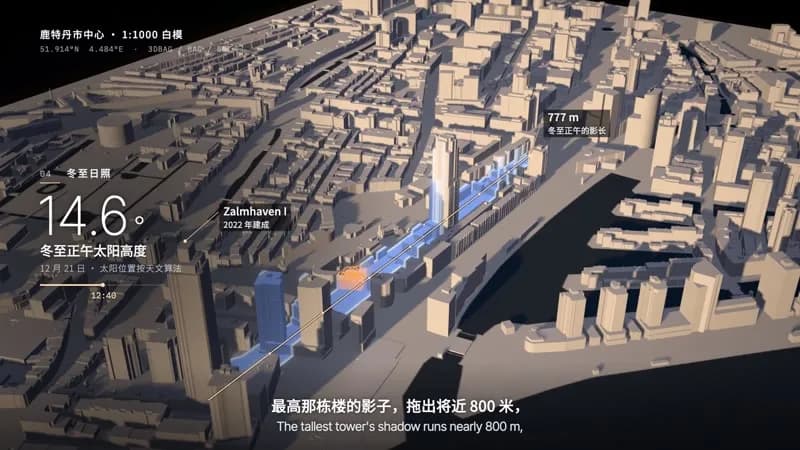
- The sun is a real directional light with shadow maps, computed from the place's latitude and a real date and time (NOAA/Meeus solar position). The projector can trace what the sun does (a shadow footprint) but never fakes a shadow.
- Post: physical depth of field (stronger on close shots), bloom only above the projection highlights, vignette, light grain in ffmpeg. GTAO only on close shots: on wide grazing views it bands.
- Screen space only for the 2D layer: readouts, pins, measured lines and subtitles go through the camera's world → screen function so they stay pinned to the model.
- Keep a FACTS.md in the project folder (claim, source URL, quoted wording, or the measurement method) and deliver it with the film; every number on screen is computed by a script from the same data as the model.
3. Colour logic
- Neutral ground: white model, dark room (near black), dark plinth. Projector black level is a cool near-black on the plate.
- One hue family per layer, chosen for the data: a single categorical accent for "the old/the exception" (e.g. warm amber), a sequential ramp for continuous data (blue → cyan → white for time, violet → magenta → peach for height).
- A colour may return only with the same meaning (the "before" colour reused later marks the same set of buildings).
- The sun is warm, its shade is a projected deep blue; data colours are put away when the sun arrives.
- Never colour the model in the house light; never use more than two layer palettes on screen at once.
4. Type & subtitles
- Roles: a light grotesk for the figure (Inter Tight 200, 120–140 px), a sans for labels in the film's language (Noto Sans SC 300/500, 20–36 px), a monospace for instruments, years and coordinates (IBM Plex Mono, 18–22 px). OFL, self-hosted, CJK subset.
- Readout in the left third, one per layer: index + layer name, one figure, one label, one source line, a legend bar.
- Pins: a hairline from a roof or a ground point up to a tag on a dark plate (title 26 px + one sub line 20 px).
- Identity label top-left, quiet: place, scale, data sources.
- Subtitles centred at the bottom on a soft dark gradient, no box, measured with the real fonts; if the film is bilingual, the film's language on top, each language on a single line, split into two cues rather than wrap.
- Nothing below 18 px at 1080p. Hold subtitles ≥ max(1.8 s, speech + 0.6 s); labels ≥ characters ÷ 4.5 + 1.5 s (CJK), letters ÷ 15 + 1.5 s (Latin).
5. Motion quality
- The camera moves continuously and slowly; it changes speed with the layers, never stops dead.
- Light is the actor. Each layer arrives by a soft-edged gesture of light: a wash spreading from the projector axis, buildings switching on one by one with a short flash, a level climbing every facade, the sun's clock running. No hard line sweeping the table.
- House lights cut fast (a relay, 0.25 s) and return slowly (1 s); the projector strikes with a brief flicker.
- Counters roll while the light moves and land when it lands; measured lines grow from A to B with ticks.
- What never moves: the model, the plinth, the pins' anchors on the model.
6. Camera grammar
| Move | What it expresses | Can serve |
|---|---|---|
| Macro glide at rooftop height, shallow focus | the model is a real object | an opening; a detail that matters |
| Crane up and back | the whole pattern only seen from above | revealing a hole, a cluster, an edge |
| Slow orbit with a rise | the city as a whole, layers accumulating | growth over time; comparisons across the model |
| Boom down to a low angle against black | height, skyline | tall buildings, heights, a single tower |
| Side-on track along a line | a measured distance on the model | a shadow, a corridor, a route, a view line |
| Pull back as the house lights return | the data stops; the object remains | an ending; a reset between topics |
At key moments the subject fills a third of the frame height; readouts left third, subtitles bottom centre, pins never over the readout. Transitions are light changes on one take (lights out, a layer replacing another, the projector going dark), not cuts, fades or wipes.
7. Sound palette
- The room: room tone, the projector fan (hum + filtered air) rising when the lamp strikes, relays for the house lights, a lamp strike (zap + thump), the air of a light wash (sliding band-passed noise).
- Light as sound: mallets and glass for things switching on, bowed vibraphone for held light, a rising mallet line and air riser for a climbing level, one glass note per highlighted building.
- Weight: timpani, gran cassa, gong, low brass for a heavy fact; warm low brass for a turn.
- Floor: contrabass and cellos only as a floor under the chords; no generic piano and strings melody.
- Silence: the projector goes dark and everything stops but a thin fan hum before the turn; a short suck-out before the heaviest hit. The first sound after the silence is the turn.
- Mix: voice about 10 dB over the music; the two designed impacts are the loudest moments; −14 LUFS, true peak ≤ −1.2 dB. Voice: calm, short declarative lines, numbers spoken plainly.
8. Native moves
- Lights out, lamp on. House light, a relay, darkness, the lamp strikes, the first layer arrives. Fits content like: a site before and after; a district before a plan is shown; any "now look closer".
- The hole. Light only the set that answers a question (built before a date, owned by one party, inside a zone) and let the absence draw the shape. Fits content like: a war-damaged centre; a flood plain with no housing; land a company owns; a protected zone.
- Layers by time. Buildings switch on in the decade they were built, each layer faster than the last, a year counter rolling. Fits content like: a new town's growth; a campus master plan by phase; a port's expansion; a developer's portfolio by year.
- The rising level. A soft level of light climbs every facade at once; low buildings finish first, the tallest last, the reading rides up with it. Fits content like: building heights; sea-level or flood depth; floor counts; a height limit being tested.
- The sun clock. A real sun at a real date sweeps the shadows; the projector then traces one shadow and measures it. Fits content like: a new tower's shadow on a park; winter light in a courtyard; solar panels' best roofs; a street's daylight hours.
- The pick-out. One building or set lights alone while the rest stay dark, with a pin. Fits content like: a listed building; the plot for sale; the hospital in an evacuation plan.
- Lights up. The data stops, the white model comes back. An ending or a reset.
9. Pitfalls of the medium
- Wall normals wound the wrong way show inside faces (walls look hollow): derive the outward normal from ring orientation. Shared walls between parts z-fight: skip the overlap below the lower neighbour.
- Warm HDRIs turn the white model beige: use a neutral studio environment.
- GTAO on wide grazing views produces wedge-shaped dark bands; keep it on close shots only.
- A low sun lights facades, not roofs: shoot from the sunlit side or side-on. Narrow shadows vanish among all the others: trace the one that matters (fill + edge) and measure it.
- Hairline scan lines read as laser scanning: give every projection front a wide soft edge or switch buildings individually.
- Floating labels: anchor pins on the tallest part of a building, not on its footprint centroid.
- Numbers from mixed sources (official height vs measured roof): say which on screen ("roof", "measured").
10. Engine
demo/studio.js—makeStudio(W, H, model): renderer, post, room, the projection material (projMaterial(kind)injectsprojLight()/roofGlow()into MeshStandardMaterial), the city mesh (buildCity: outward normals, shared walls removed), plate, plinth, house light (index 0) and sun (index 1). UniformsUdrive every layer.demo/tools/prep.py— 3DBAG + BGT only: it reads 3DBAG fields (b3_h_70p,b3_h_maaiveld,oorspronkelijkbouwjaar) and Dutch RD coordinates (tools/rd.py). Another source needs its own adapter that writes the samemodel.json:{size:[w,d] model metres, b:[[year|0, height_m], …] per building, p:[[building_index, height_model_m, [[[x,z],…] outer ring, …holes]], …] per roof part, decks:[[[x,z],…]]}, with x east, z south, 1 unit = 1 model metre; pluswater.png(plate-sized mask) and astats.jsonwith every on-screen number.tools/sun.py(solar position, any place and date) and the heightfield shadow are source-independent.demo/overlay.js— readout, pin, measured range line, subtitle strip, title card; registers texts for readcheck.- Extra packages and packs: none beyond
setup.sh deps(+voice,musicfor narration and score); downloads are plaincurlfrom the data portal. Reprojecting another country's data may need pyproj or shapely: the agent installs them itself into a private venv in the project folder, not into$LIB/.venv. - Minimal example, not in the demo: set
U.uPreCto a station andU.uPreRgrowing to light everything within walking distance; or put a flood height inU.uHgtFwithU.uHgtBandheld at 1 and leave it still.
11. Variation space
Decide per film: place and scale, which layers in what order, their colours, the opening, the camera path, the ending, the pace.
- Structures: a question answered layer by layer; a plan versus today (the plan's buildings switching on in a second colour); one building's story told by its neighbours.
- Openings: a macro glide over white roofs; darkness and a single pick-out; the plinth from across the room as the house lights fall.
- Endings: lights up on the white model; one last layer left on alone; the camera rising until the model is an object on a table in a dark room.
How our demo was made (story, shots, score, title card, build): DEMO.md. Read it after your treatment exists.
补充
示范片
How a Flattened City Grew Back
本风格的来源项目:开源项目 Lemo-Opuscar(项目仓库)。本站保留原项目署名,具体许可以该项目仓库为准。
分享来源:B 站视频(341 种代码动画风格)